Translate the provided English OghmaNano HTML/PHP page into Simplified Chinese (zh-Hans) by performing a strict, diff-only transformation: preserve all HTML, PHP, structure, order, IDs, classes, scripts, includes, include count, include locations, tables, menus, analytics, schema, and layout exactly as-is; do NOT add, remove, duplicate, reorder, or re-insert any PHP include statements; change to ; if and only if the English page does not already set $lang or include menu_top.html, then immediately after insert "$lang='zh-Hans'; include($_SERVER['DOCUMENT_ROOT'].'/menu_top.html');", otherwise do not add a second include; in the $meta array translate title and description faithfully (no SEO rewriting), change canonical to the /zh/ version, ensure 'lang' => 'zh-Hans', and ensure 'i18n_key' exists and is set deterministically to the canonical path WITHOUT the scheme/host and WITHOUT the /zh prefix (i.e., i18n_key = parse_url(canonical,PHP_URL_PATH) with any leading '/zh' removed); keep all other existing meta keys unchanged and do not add or remove any others; translate all visible text into professional, technical Simplified Chinese without adding, expanding, enriching, summarising, editorialising, or improving content; use standard physics terminology (drift–diffusion, SRH, transfer-matrix, etc.) while keeping scientific abbreviations (JV, OLED, OFET, EQE, SRH) in Latin characters; convert every localized_url(...,'en') to localized_url(...,'zh') and do not alter other URLs; translate headings, lists, buttons, and duplicated mobile/desktop sections consistently while keeping IDs, styles, emojis, symbols, punctuation, line breaks, and formatting exactly matching the English source; translate “Translations” to “翻译版本” and keep get_translations(0) unchanged; do NOT add structured data (JSON-LD), schema, emojis, new sections, new text, new links, new scripts, or metadata that does not already exist in the English source EXCEPT adding 'lang' and the deterministic 'i18n_key' as defined above; output a complete valid HTML file only, with no commentary or explanations. If the English source contains any JSON-LD/schema/script blocks (including application/ld+json), keep them byte-identical (do not translate, do not change URLs, do not add/remove fields), and if the English source does not contain them, do not add them. Troubleshooting - OghmaNano User Manual
Home Examples Screenshots User manual Bluesky logo YouTube 中文
OghmaNano Simulate organic/Perovskite Solar Cells, OFETs, and OLEDs DOWNLOAD

Troubleshooting

Windows gives warms me the software is unsigned

When you first install or run OghmaNano on Windows, the operating system may show a warning that the software is "unsigned" or "from an unknown publisher." This message does not mean the program is unsafe – it simply means that the installer has not been signed with a commercial code-signing certificate.

Code signing is essentially a way of attaching a digital signature purchased from a certificate authority. While it can make installation smoother, it is not a guarantee of software quality or security. Many legitimate open-source and academic tools are distributed unsigned because obtaining and renewing a certificate costs hundreds of pounds or dollars per year. For small research projects and academic software, this money is often better spent on actual development rather than on paperwork with a third-party authority.

Running unsigned software is common in research environments, and Windows provides the warning mainly so that users pause before installing programs they did not expect to download. As long as you obtain OghmaNano directly from the official website (oghma-nano.com), you can be confident you are getting the authentic version. Once installed, the program runs normally, and the unsigned status does not affect simulation performance or functionality in any way.

Why don’t I get a 3D view of the device

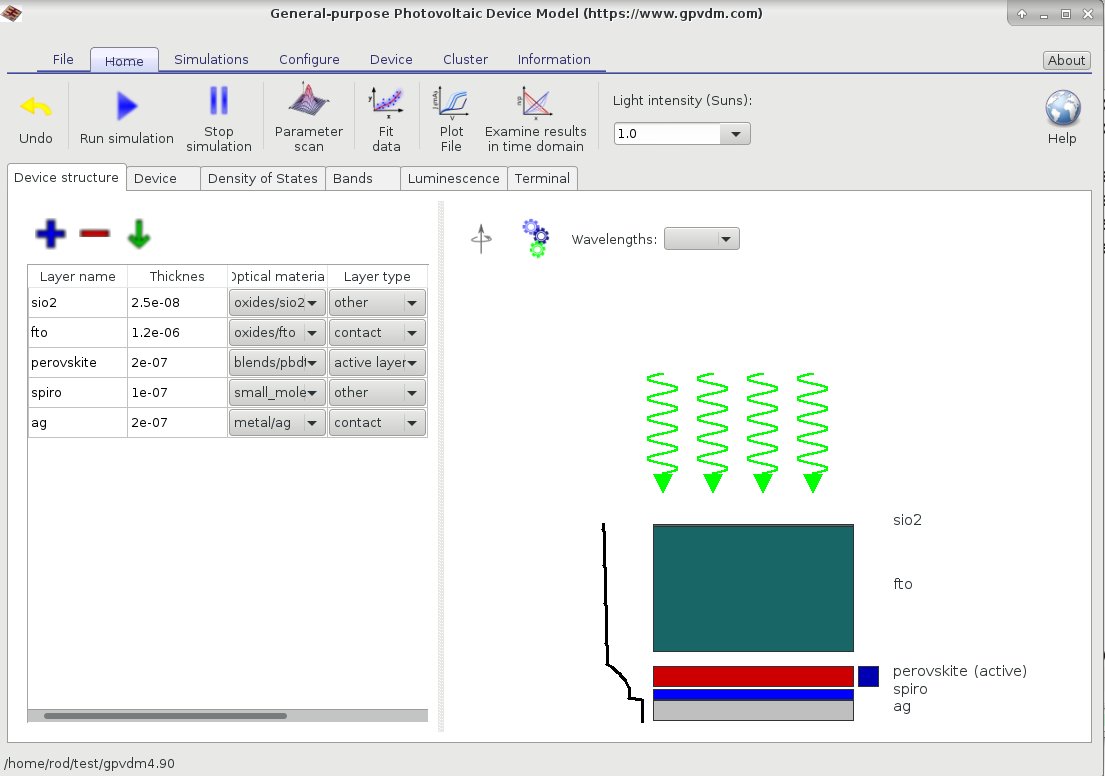
Screenshot of OghmaNano simulation window without 3D acceleration: flat, unshaded view of the device
OghmaNano running on a system without 3D acceleration hardware or drivers. The device view appears flat and lacks shaded rendering. Although visualisation is limited in this mode, all simulations still run correctly.
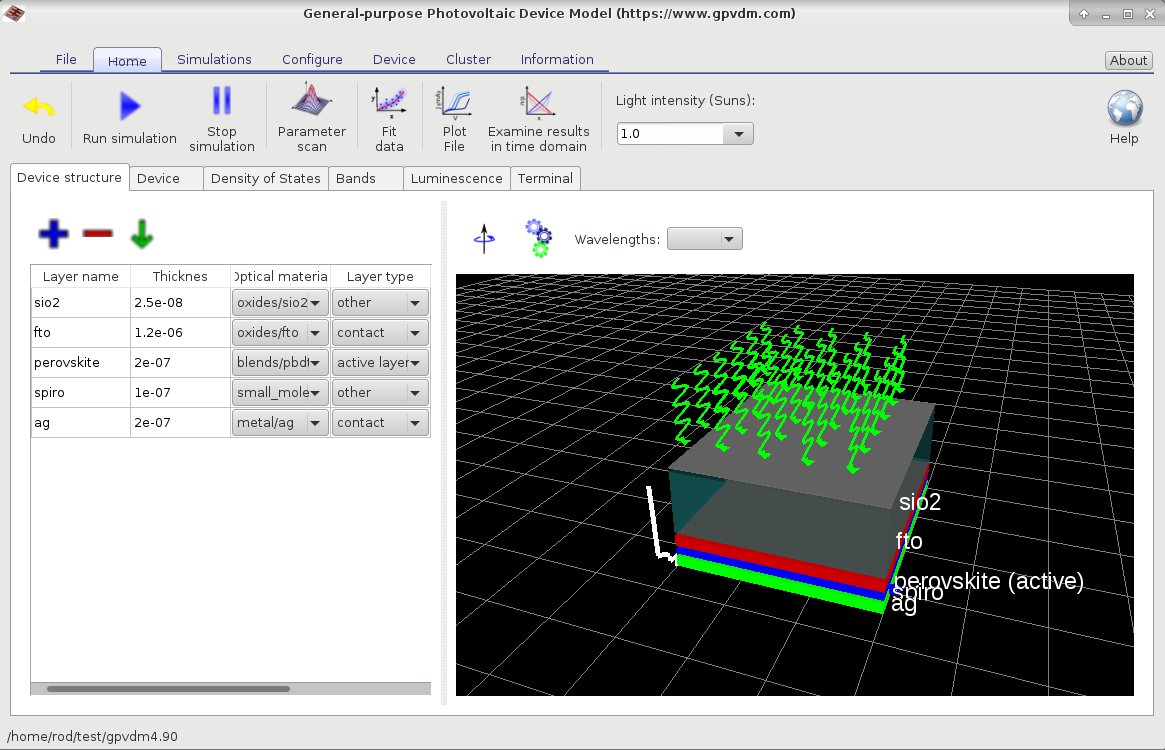
Screenshot of OghmaNano simulation window with 3D acceleration: shaded, perspective view of the device
OghmaNano running on a system with working 3D acceleration hardware. The device view is shaded, perspective-correct, and easier to interpret. 3D acceleration enhances the visualisation experience but does not affect the accuracy of the simulations themselves.

If your simulation window appears as shown in ?? rather than ??, it usually indicates that your system is not making use of 3D acceleration. On most modern laptops and desktops this does not mean the hardware is missing—virtually all machines are shipped with 3D-capable graphics—but rather that the drivers are not installed or are not working correctly. If you have an ATI, Nvidia, or Intel graphics card, make sure the latest drivers are properly installed.

Even very basic or older graphics cards are more than sufficient for OghmaNano’s 3D visualisation. Lack of acceleration affects only the quality of the device view, not the accuracy or speed of the simulations themselves. This is therefore a hardware/driver configuration issue, not a bug in OghmaNano.

Error: Cannot decode archive data

This occurs if the oghma_local directory in your home folder has been deleted. The oghma_local directory is required for OghmaNano to run correctly. Restoring or recreating this directory resolves the issue.

Warning: The solver has not converged very well

Drift–diffusion equations are mathematically challenging to solve. This warning indicates that the solver encountered a particularly difficult problem and could not reach an accurate solution. In some cases, the result may still be acceptable, but it is advisable to examine the specific voltage point or time step where the warning occurred. Such issues can arise if the device configuration contains parameters that are unrealistic or non-physical. Review the device design and material parameters carefully. If necessary, revert to a previously working structure and adjust parameters systematically to identify the cause.

Error: NaN detected in the Newton solver

This error typically results from a division by zero within the model. It often occurs when carrier densities (electrons or holes) in trap states become extremely low, sometimes below 1.0 m-3. Review the device setup to determine why such unphysical conditions are arising and adjust parameters accordingly.

Error: Holes asking for xxx but range zzz – yyy

Carrier distribution functions (Fermi–Dirac/Maxwell–Boltzmann) are pre-tabulated for efficiency. This error occurs when the Fermi level is pushed outside the tabulated range. Possible causes include:

To resolve the issue, ensure that the device setup is physically consistent and that changes between simulation steps are not excessively large.