

Materials database: Part B - How do I get n–k data?
1. Getting n/k data
The quickest route is usually the literature. Search for your material’s optical constants in papers and—ideally—their Supplementary Information (SI), where authors sometimes provide the raw tables. When only figures are available, you can still recover the numbers (see the digitizing tools below).
- What you need: either
- Wavelength vs n and wavelength vs k (where the complex refractive index is
N = n + i k), or - Wavelength vs α (absorption coefficient).
- Wavelength vs n and wavelength vs k (where the complex refractive index is
- Units to look for: wavelength in metres (m); n and k are dimensionless; α in m−1 (convert from cm−1 if needed).
- Avoid plots labelled “a.u.” or “normalised to 1” for absorption—those cannot be used directly in simulations.
If you find k(λ) but not α, you can convert using
α(λ) = 4π k(λ) / λ (λ in metres gives α in m−1). The OghmaNano Import Data wizard can map columns and handle common unit conversions (e.g., nm → m, μm → m, eV → m via λ = hc/E).
2. Practical search tips
- Google Scholar queries like:
“<material name>” optical constants,ellipsometry n k,absorption coefficient. - Image search when you suspect only figures exist:
<material name> n kor<material name> absorption coefficient(then digitize). - Try curated sources:
site:refractiveindex.info <material name>for many common materials.
3. Digitizing numbers from figures (when only images are available)
If the paper provides only a plot, use one of these well-supported tools to extract data to CSV:
- WebPlotDigitizer — free, browser-based, widely used; supports axes calibration, auto/hand tracing, and CSV export. :contentReference[oaicite:0]{index=0}
- PlotDigitizer — online (free) and desktop (paid) versions; auto-trace curves, export to CSV/Excel/Matlab/Python. :contentReference[oaicite:1]{index=1}
- DigitizeIt — desktop app (Windows/Mac/Linux) with auto/manual digitizing and CSV/Excel export. :contentReference[oaicite:2]{index=2}
Once you have tables of λ vs n, λ vs k, or λ vs α, save them as simple two-column text/CSV (wavelength in metres). Import them with the OghmaNano wizard to perform any final unit conversions and validation before use in simulations.
4. Data in nm/n/k formats
OghmaNano normally accepts input data only in SI units and in a single standard format. However, as an exception, OghmaNano can also read files in the format wavelength (nm), n, k
??. These files can be placed in the oghma_local/materials directory with a .nk extension (for example, ito.nk). When present, they will appear in the Materials database ??. It should be noted that this format is intended only for compatibility with external databases that provide optical constants in nanometres, n, and k. Materials stored in this way are limited: additional properties such as electrical parameters or emission spectra cannot be added. This makes .nk files a special-case format, suitable only when no SI-based data are available.
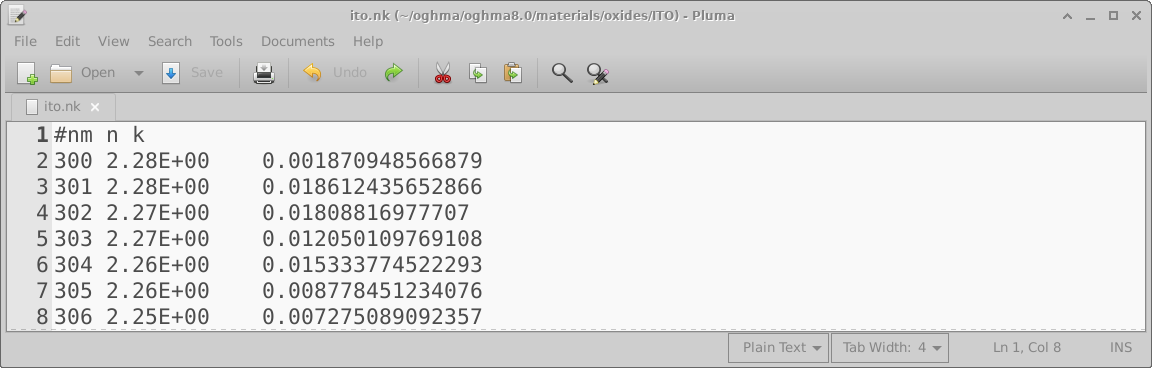
.nk file containing wavelength, refractive index (n),
and extinction coefficient (k) data.
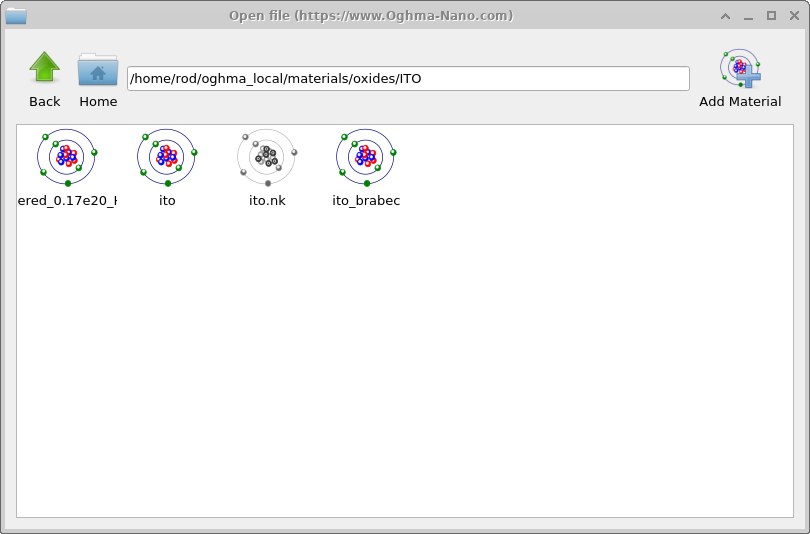
.nk file in the Materials database, greyed out to indicate that,
while readable, it is not in native OghmaNano format.